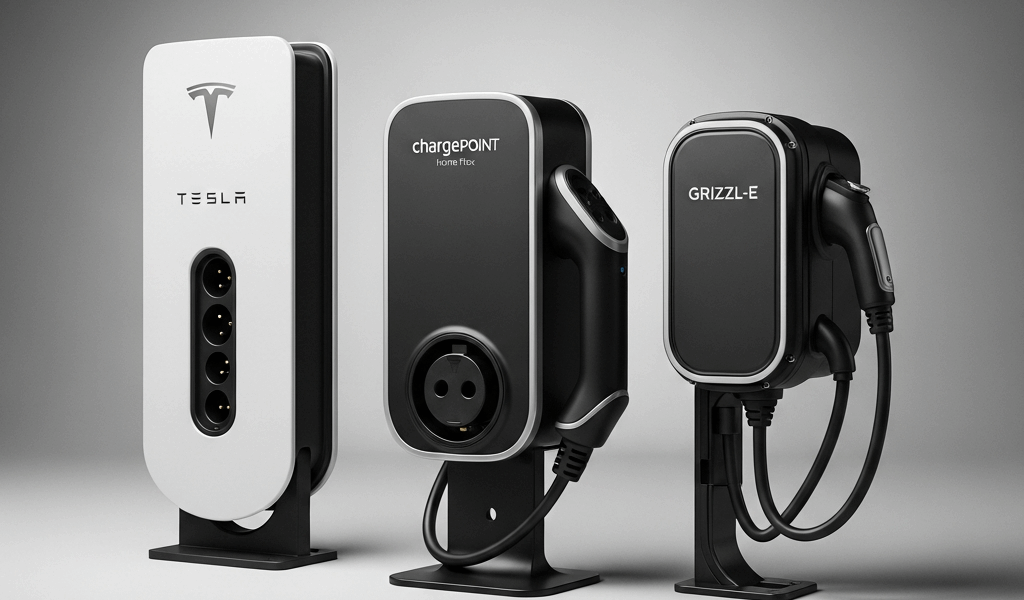
Tesla Wall Connector vs ChargePoint Home Flex vs Grizzl-E — Which Level 2 Charger Wins
Home EV charging has gotten complicated with all the listicles and spec-sheet noise flying around. As someone who has installed all three of these units across two homes and a rental property, I learned everything there is to know about the Tesla Wall Connector Gen 3, the ChargePoint Home Flex, and the Grizzl-E Classic. The short version? They’re all capable chargers — but built for completely different owners. Pick the wrong one and you’ll feel it every single day.
This article includes affiliate links. We may earn a commission at no extra cost to you.
Don’t make my mistake. When I got my Model 3 in 2021, then picked up a used Chevy Bolt for my wife two years later, I suddenly had a charging setup that made zero sense for our actual lives. This is the guide I wish I’d had before that happened.
Three Chargers, Three Philosophies
Probably should have opened with this section, honestly. The design philosophy behind each charger explains almost every spec difference you’ll read below.
But what is the Tesla Wall Connector, really? In essence, it’s a wall-mounted EVSE designed to disappear into your garage and just work. But it’s much more than that — it’s the physical extension of Tesla’s whole ecosystem logic. Sleek white slab, mounts flush, communicates directly with your car. No account creation. No separate app dance. You plug in, the car and charger negotiate over the cable, and charging starts. Tesla owners who’ve never used anything else genuinely don’t realize how much friction other chargers introduce until they try one.
ChargePoint’s Home Flex runs on the opposite philosophy entirely. ChargePoint is, at its core, a commercial charging network — and the Home Flex drags that network-level thinking into your garage. Scheduling, energy cost tracking, utility rate integration, real-time push notifications. It wants to be the hub of your home energy setup, not just a cord on a wall.
The Grizzl-E — made by a Canadian outfit called United Chargers — doesn’t care about philosophies. It’s a gray metal box that looks like it belongs bolted to a warehouse loading dock. Costs less than the other two. Works at minus-40°F. Charges your car. That’s it. No WiFi version even existed when I bought mine — they’ve since added one, apparently — but the original design treated internet connectivity as optional. That’s what makes the Grizzl-E endearing to us pragmatist EV owners who are deeply tired of IoT devices that need a firmware update to do their one job.
Charging Speed and Power Comparison
Here’s where the specs actually matter, and where I see the most confusion.
- Tesla Wall Connector Gen 3 — up to 48 amps, 11.5 kW output
- ChargePoint Home Flex — up to 50 amps, 12 kW output (adjustable from 16A to 50A)
- Grizzl-E Classic — up to 40 amps, 9.6 kW output
On paper, the ChargePoint wins. Fifty amps is the highest you’ll find in residential Level 2 hardware without crossing into commercial territory. But let’s be real about when those extra 2 amps over the Tesla actually matter in daily driving — almost never.
Most EVs can’t accept more than 48 amps through their onboard charger anyway. The Model 3 and Model Y are capped at 48A regardless of what you plug them into. The Chevy Bolt maxes out at 32A. The Mustang Mach-E tops at 48A. Check your car’s spec sheet before assuming a 50-amp charger will add speed. The bottleneck is almost always the vehicle.
The Grizzl-E’s 40-amp ceiling is where the real-world gap shows up. At 9.6 kW versus 11.5 kW, you’re looking at roughly 24 miles of range per hour versus about 29 miles per hour — assuming a Tesla on the receiving end. Over an eight-hour overnight session, that’s around 40 miles of range difference. If you’re regularly driving 200-plus miles a day and charging overnight, that gap matters. If you’re commuting 40 miles round-trip and plugging in every night, it’s completely invisible.
The ChargePoint’s adjustable amperage deserves a real mention here. When I installed mine on a circuit that was already carrying some load, I dialed it back to 32A temporarily — then bumped it up after I had panel work done. That flexibility is genuinely useful during installation, especially in older homes where the electrical panel isn’t quite ready for a full 60-amp dedicated circuit.
Smart Features and App Quality
I’ve tested all three through years of daily use and a few memorable app failures. My preferences here surprised even me.
ChargePoint’s app is the most feature-rich — scheduled charging, session history, energy usage broken down by cost, notifications when charging starts or stops, and integration with some utility demand-response programs that can actually pay you to shift your charging off-peak. Clean interface, reasonably fast. If you want to know exactly what your EV charging added to your electric bill last month — down to the dollar — ChargePoint gives you that.
The Tesla Wall Connector doesn’t have its own standalone app. Everything lives inside the Tesla app itself — scheduling, charge limits, session history, all fully integrated and working flawlessly because the car and charger share a manufacturer. The catch is obvious: plug a Volkswagen ID.4 into a Tesla Wall Connector and you get basic Level 2 charging with zero smart features. No scheduling through the charger. No energy tracking. Nothing.
The original Grizzl-E Classic — the non-WiFi version I have — does nothing smart at all. No app. No scheduling unless your car supports departure-time charging natively. You plug it in. It charges. What the Grizzl-E does do is charge your car in conditions that caused me real problems with the other two. One February morning in upstate New York, my ChargePoint went into a connectivity loop and refused to start a session because it couldn’t confirm my scheduled time with the server. The Grizzl-E — mounted outside under a basic plastic cover — started charging just fine at minus-15°F that same week. That’s the trade-off in concrete terms.
For the record, ChargePoint fixed most of those connectivity issues through firmware updates. No recurrence in over a year. But the episode stuck with me.
Installation Cost and Complexity
All three chargers support either a NEMA 14-50 outlet — same plug used by most electric ranges — or direct hardwiring to your panel. Both methods require a dedicated 240V circuit. Hardwiring is cleaner and eliminates the outlet as a potential failure point. Using a NEMA 14-50 means you can take the charger with you when you move.
Charger prices as of my most recent check:
- Tesla Wall Connector Gen 3 — $400 directly from Tesla
- ChargePoint Home Flex — $699 at most retailers, frequently on sale for $499–$549
- Grizzl-E Classic — $259–$289 depending on configuration
Electrician cost to install a 240V circuit with a dedicated 60-amp breaker typically runs $300–$600 — depending on how far your panel sits from your garage and how much conduit work is involved. I paid $425 and got two quotes before hiring anyone. First, you should get multiple quotes — at least if you want to avoid overpaying by $200 for work that takes ninety minutes.
Cord length might be the most underestimated factor in this whole decision. The Tesla Wall Connector ships with an 18-foot cable — covers almost any parking orientation in a standard single-car garage. The ChargePoint Home Flex comes with a 23-foot cable, the longest of the three, which is genuinely useful in awkward garages or two-car households where someone’s always parking deep. The Grizzl-E Classic also ships with 18 feet.
Don’t make my mistake. I let my electrician mount the ChargePoint on the short wall of my garage to minimize conduit runs, and the 23-foot cable barely reached my car after I switched from a Model 3 (charging port rear-left) to a Mach-E (charging port front-left). Measure your actual parking position before deciding where the charger gets mounted. I know that sounds obvious. Do it anyway.
The Tesla Wall Connector also supports daisy-chaining — up to four units on a single circuit, automatically sharing power between them. It’s a legitimately clever feature for multi-Tesla households. ChargePoint has no residential equivalent. Neither does Grizzl-E.
The Verdict — Best for Each EV Owner Type
There’s no objectively best charger here. There is a best charger for your specific situation — and after installing and living with all three, here’s how I actually break it down.
You Drive a Tesla — Get the Tesla Wall Connector
The integration is too good to leave on the table. Scheduled charging, charge limits, session history — all of it works natively through the Tesla app without any additional setup. The 18-foot cable handles standard garage setups. The design is genuinely attractive, which matters when it’s mounted on your garage wall for the next decade. At $400, it’s mid-range in price, but the ownership experience justifies the premium over the Grizzl-E if you’re already in the Tesla ecosystem. This isn’t brand loyalty — it’s just the practical reality of buying hardware from the same company that built your car.
You Drive a Non-Tesla EV or Have Multiple EVs — Get the ChargePoint Home Flex
ChargePoint might be the best option here, as multi-EV ownership requires maximum flexibility. That is because the Home Flex works with every J1772-compatible vehicle on the market — past, present, and presumably future. The smart features are genuinely useful, not gimmicks, especially if your utility runs time-of-use rates. The 23-foot cable is the most accommodating of the three. Yes, it costs more. The app experience makes that defensible if you actually use the features, and most ChargePoint owners do.
You Live Somewhere Cold, Rural, or Just Don’t Trust the Cloud — Get the Grizzl-E
While you won’t need commercial-grade charging hardware for a home garage, you will need a handful of qualities the Grizzl-E delivers better than anything else at this price: ETL certification, genuine outdoor-rated durability, and zero dependency on a functioning internet connection. At $259 it’s the cheapest option by a meaningful margin — and the money you save covers most of your electrician bill. If you’ve ever had a smart home device fail at an inconvenient moment and silently vowed to stop buying connected gadgets, the Grizzl-E is your charger.
The Overall Winner
If I had to recommend one charger to someone who hadn’t told me anything about their situation, it’d be the ChargePoint Home Flex. Works with any EV. Most flexible amperage settings for varying panel situations. Best smart features in the category. Longest cable. The price is the only real argument against it — and in the context of what you’ve already spent on the car itself, the $100–$200 premium over the competition is not the place to economize.
The Tesla Wall Connector is the better answer specifically for Tesla owners. The Grizzl-E is the better answer specifically for people who prioritize durability and simplicity over features. Neither of those is a consolation prize — they’re genuinely the right tool for their intended user. The ChargePoint just wins for everyone else.

Stay in the loop
Get the latest northwestevcharge.com updates delivered to your inbox.